 by
by Implementing movement is a fundamental step in any game, and Gäelith is no exception. I’ve now completed the basic movement for both the player and the stones, using one of the most popular Unity plugins: DOTween. As they describe themselves, DOTween is “a fast, efficient, fully type-safe object-oriented animation engine for Unity, optimized for C# users, free and open-source, with tons of advanced features.” And I completely agree—it’s a fantastic tool that simplifies animation handling while offering great flexibility.
Implementing Movement with DOTween
For now, Gäelith’s movement is temporary—he can walk forward and rotate, but I plan to refine it later with full physics-based movement and possibly even a mouse-click control option. However, the stone movements will remain as they are, using DOTween. When Gäelith pushes a stone, it will smoothly slide across the ground until it collides with an obstacle.
A key aspect of working with DOTween is choosing the right easing functions. Easing determines how an object accelerates or decelerates during movement, making animations feel more natural. If you’re unfamiliar with easing, you can check out this great visual reference: easings.net.
To fine-tune the stone movement, I tested two different easing effects: OutCirc and OutCubic. In the video included in this post, you can see both options side by side. After comparing them, OutCubic was the clear winner, as it produced a more fluid and natural motion.
Precision with Unity Physics
One of the biggest challenges was ensuring movement calculations were both accurate and aligned with the game’s grid system. Gäelith moves on a structured 2D coordinate system, so every movement needs to fit neatly into this “chessboard” layout.
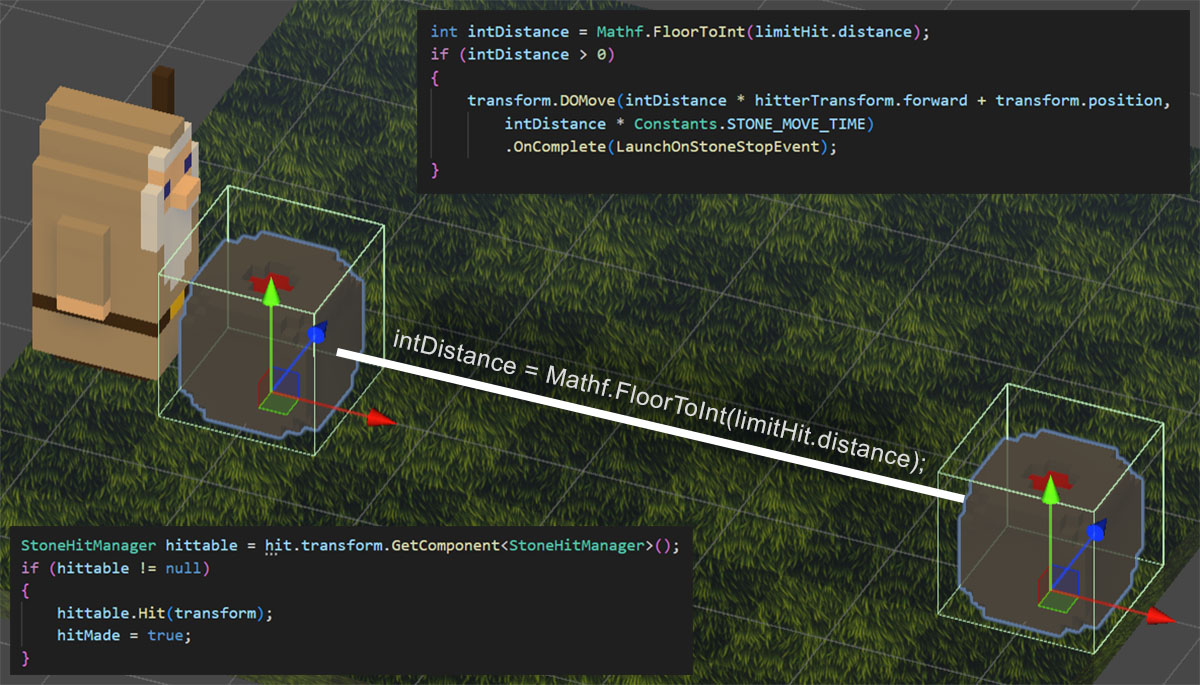
At first, I used small colliders in front of Gäelith and on the sides of the stones to detect interactions. This approach worked most of the time, but during fast movements, the event system occasionally missed detections, leading to inconsistent behavior.
To solve this, I refactored everything and switched to raycasts, leveraging Unity’s physics engine for precise and reliable detection. With raycasts, I could accurately check for obstacles and ensure that movements remained fully aligned with the grid. This change immediately improved reliability, and I was able to quickly complete two key features from the Project Design Document: F.1.02 Gäelith Movements and F.1.03 Stone Movements.
The Game Starts Taking Shape
With movement and interactions in place, Gäelith is finally starting to feel like a real game. Seeing Gäelith push stones and navigate the grid is a huge milestone, and there’s plenty more to come. Stay tuned for the next update as I continue refining the mechanics and expanding the world!